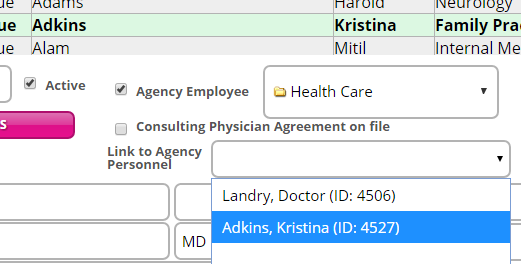
Some of the enhanced documents allow multiple users to electronically sign the document, when necessary. In order to provide support for physician signatures, a new Link to Agency Personnel drop-down field is available in Master Files | Physicians. As shown in the sample image, this field allows users to associate an existing physician record with the corresponding personnel record for the agency.
Though this feature is integrated within applicable documents, the use of multi-signature is completely optional. Agencies are not required to use this functionality. The information below provides additional context about the multi-signature functionality, including a list of applicable documents as well as setup requirements.
For agencies that opt to utilize the integrated multi-signature feature in the enhanced hospice documents, this functionality is available in the following hospice documents:
● CTI - Initial 90
● CTI - Second 90
● CTI - 60 Day
● Face to Face Encounter
● IDT Meeting Note
|
|
This document is only available within the new IDT Meeting screen. |
● Plan of Care – Physician’s Order (if either the CTI and/or Face to Face section is added.
Though this feature is optional, users that plan to utilize the multi-signature feature may need to complete minor setup for their user account. To successfully use the multi-signature feature and enable the software to synchronize information in Document Tracking, the following requirements must be satisfied:
● Clinician must have an employee record setup in Personnel.
● Electronic Signature must be entered for the corresponding clinician user account in Administration | User Security.
● For Physicians: Physician record must be linked with their personnel record:
o Designate the corresponding personnel record for the physician. In Personnel | Employment, the “Physician” option should be selected in the Personnel Type field (within the Employment Terms section).
|
|
Options in the Personnel Type field populate from existing records that are set up in Reference Files | Personnel Type. The personnel type record that is established for the physician is designated with a Job Class of "Physician". |
o Associate the physician master file record with the corresponding personnel record (in Master Files | Physicians) by selecting the physician name from the Link to Agency Personnel drop-down menu.
